
When connecting to a Mac
This error might occur if you’re trying to connect as a guest user, but that authentication method isn’t available.
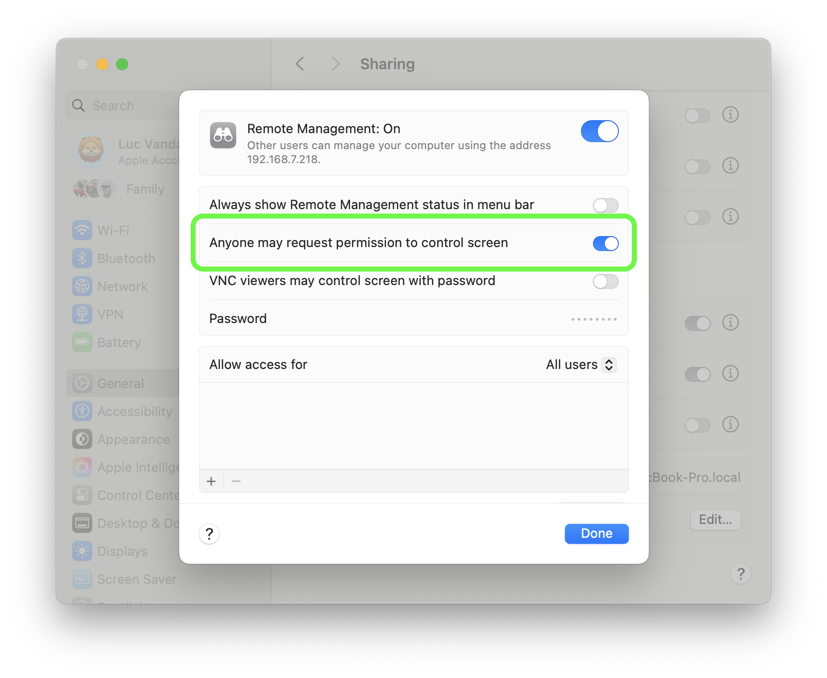
Ensure that the option Anyone may request permission to control screen is enabled in either Screen Sharing or Remote Management under System Settings > General on the Mac you’re trying to connect to.
When connecting to a PC
This error occurs when the authentication type selected in your Screens connection settings isn’t supported by the remote computer’s VNC server.
To fix this, check which authentication methods are supported by the remote VNC server and make sure to select one of those in Screens. For example, some servers only allow VNC Password, while others (like Raspberry Pi) may also support RSA-AES.
If the selected type doesn’t match one of the supported options, Screens will not be able to connect. Updating the connection settings to use a supported authentication method should resolve the issue.